PHP 中 file_get_contents($url) 设置超时
在 PHP 中,使用 file_get_contents($url) 函数进行网络请求时,默认情况下没有超时设置。如果请求的远程 URL 响应时间过长,可能会导致脚本挂起。为了解决这个问题,可以使用 stream_context_create 函数来设置超时参数。
以下是如何设置超时的具体步骤和示例代码。
1. 设置超时的基本方法
使用 stream_context_create 创建一个流上下文,并设置 http 选项中的 timeout 参数。
示例代码
|
2. 代码说明
stream_context_create($options):创建一个流上下文,$options数组中设置 HTTP 请求的选项。"timeout" => 5:设置超时时间为 5 秒。可以根据需要调整这个值。@符号:用于抑制警告,防止在请求失败时输出错误信息。
3. 处理错误
在实际应用中,建议对请求失败或超时的情况进行处理。可以根据具体需求添加更多的错误处理逻辑。例如:
if ($response === FALSE) { |
4. 其他选项
除了设置超时,还可以添加其他 HTTP 选项,例如:
method:设置请求方法(如GET,POST)。header:设置请求头。content:设置 POST 请求的内容。
示例:POST 请求
|
本博客所有文章除特别声明外,均采用 CC BY-NC-SA 4.0 许可协议。转载请注明来源 Leon!
相关推荐
2019-12-16
[踩坑] Swoole 4.2.11低版本不抛错 执行不同静态方法一定次数 进程异常退出 `PHP Deprecated: Non-static method `
很久之前运维同学通知我 线上服务器 产生大量 core.15…. 文件 磁盘快占满了 我没在意.今天发现线上有个服务的否个进程运行出了问题.找了一下午问题. 都没找明白 . 想起每次找swoole官方回复都是 版本太低, 先升级到最新版本. 抱着试试看的心态. 升级swoole 到 4.4.12 在运行发现如下错误: PHP Deprecated: Non-static method Controller\Test::func() should not be called statically in /data/application/QuantPlatform/script/src/Controller/Test.php on line 41PHP Deprecated: Swoole\Timer::swoole_timer_tick() expects parameter 2 to be a valid callback, non-static method Controller\Test::func() should not be called statically...
2016-06-19
php-fpm 平滑重启和快速重启
PHP-FPM 平滑重启和快速重启在使用 PHP-FPM 作为 PHP 解释器时,我们经常需要对 PHP-FPM 进行重启以应用配置或重新加载 PHP 脚本。本篇博客将介绍如何进行平滑重启和快速重启,并解释它们之间的区别。 什么是 PHP-FPM?PHP-FPM(FastCGI Process Manager)是一个用于管理和运行 PHP 脚本的 FastCGI 进程管理器。它作为一个独立的进程运行,并处理来自 Web 服务器的 PHP 请求。 平滑重启平滑重启是指在不中断已有请求的情况下重新加载 PHP-FPM 进程。 要进行平滑重启,我们可以使用以下命令: sudo service php-fpm reload 或者,如果你的系统使用 systemd,可以使用以下命令: sudo systemctl reload php-fpm 执行平滑重启后,PHP-FPM 将重新加载配置文件和 PHP 脚本,并启动新的 PHP-FPM 进程来处理新的请求。同时,已有的 PHP-FPM 进程将继续处理它们的请求,直到处理完毕后才会停止。 平滑重启对于生产环境非常有用,因为它不会中断...
2019-11-16
Webscocket pong 包 php 踩坑实例
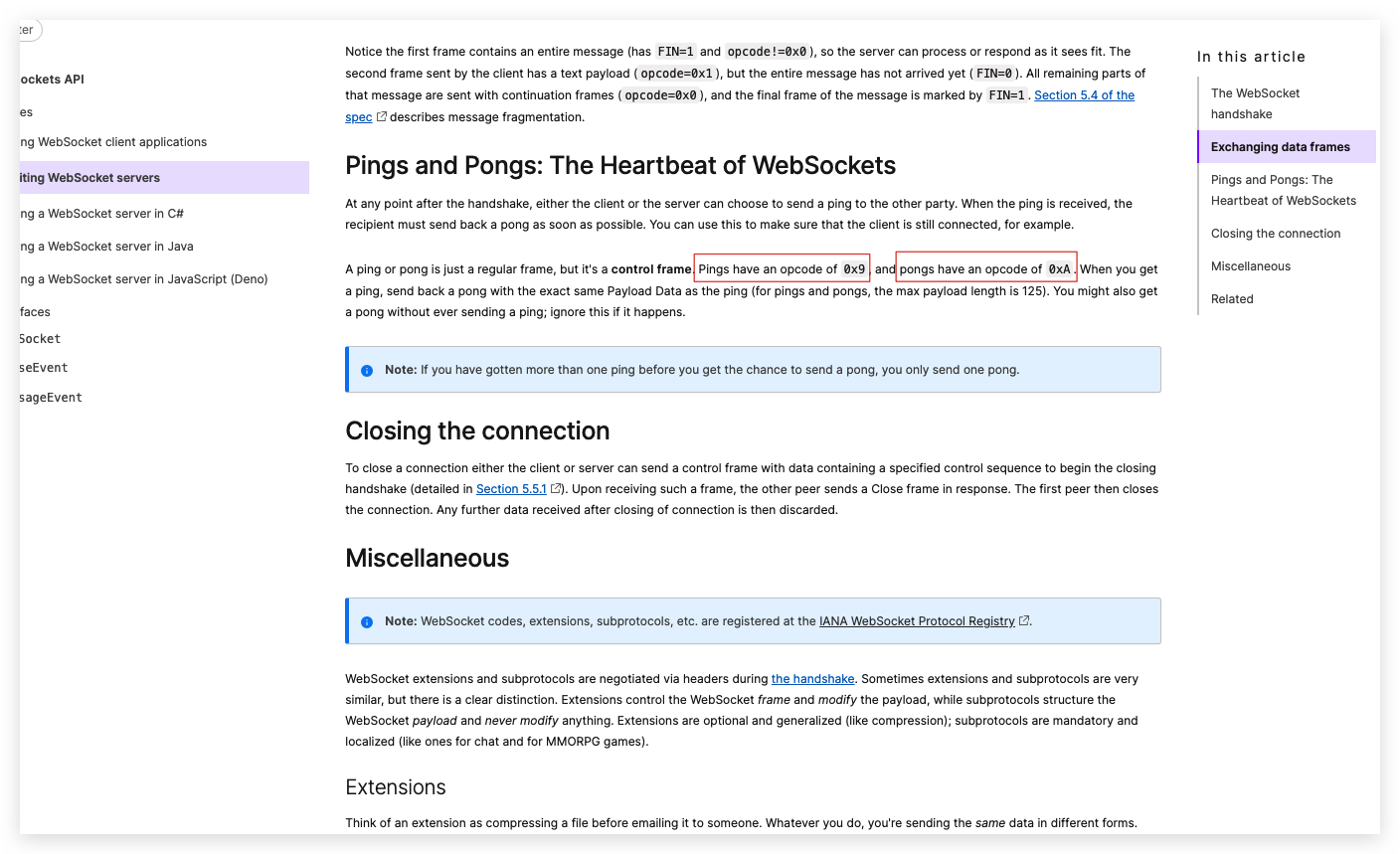
故事背景是这样的. 我要接入某安的 webscocket推送服务, 但这个服务要求接到ping后10分钟内必须返回一个pong 包.因为之前没用过php 的 ping-pong 包, 所以以为pong 就是 send 字符串 pong 就可以了, 某安的文档中也没有 pong包示例. 我同事帮我查询 资料 ping 和 pong :WebSockets的心跳 在握手之后客户端或服务端都可以选择向另一方发送ping。收到ping消息后,接受者必须尽快发回pong消息。您可以使用此方式来确保客户端仍处于连接状态。 ping 和 pong 只是一个常规的消息帧,但它是一个 管理帧. ping的 opcode 为 0x9,pong的 opcode 为 0xA。当你得到ping消息,回复一个pong消息, 带有完全相同的数据(对于ping和pong,最大数据长度为125字节).可能在你没法ping的时候也能收到pong消息 ,这种情况下直接忽略就可以了. 如果在你回pong消息之前你收到了不止一个ping消息, 那么你只用回一个pong消息即可. code 处理如下: ping 包...
2016-09-22
PHP如何修改session的生存时间
PHP 如何修改 Session 的生存时间在 PHP 中,Session 是一种用于跟踪用户状态的机制,通过在服务器端存储用户数据,并使用会话 ID 进行身份验证和数据关联。默认情况下,Session 的生存时间是由服务器配置决定的,但你也可以通过 PHP 的相关函数来修改 Session 的生存时间。本篇博客将介绍如何在 PHP 中修改 Session 的生存时间。 1. 使用 session.cookie_lifetime 设置PHP 提供了 session.cookie_lifetime 配置选项,用于设置 Session Cookie 的生存时间(以秒为单位)。该选项决定了客户端浏览器中的 Session Cookie 的过期时间,从而间接影响了 Session 的生存时间。 示例: // 设置 Session Cookie 的生存时间为 1 小时ini_set('session.cookie_lifetime', 3600); 在上述示例中,通过 ini_set() 函数设置 session.cookie_lifetime 选项为 3600 ...
2015-12-15
PHP设计模式:工厂模式
PHP设计模式:工厂模式在软件开发中,设计模式是一种被广泛应用的解决特定问题的可复用设计方案。工厂模式是一种常见的设计模式,用于封装对象的实例化过程,并提供对这些实例的统一访问接口。在PHP开发中,工厂模式被广泛用于创建对象的场景,以提供更灵活和可扩展的代码。本文将介绍PHP中的工厂模式实现和最佳实践。 工厂模式的实现在PHP中,工厂模式可以通过以下方式实现: 创建抽象工厂类(Abstract Factory Class):抽象工厂类定义了创建对象的方法,但并不实现具体的对象创建逻辑。 创建具体工厂类(Concrete Factory Class):具体工厂类继承自抽象工厂类,并实现具体的对象创建逻辑。 创建抽象产品类(Abstract Product Class):抽象产品类定义了产品的通用接口,但并不实现具体的功能。 创建具体产品类(Concrete Product Class):具体产品类继承自抽象产品类,并实现具体的功能。 下面是一个示例代码: <?php// 抽象产品类abstract class Product { abstract pu...
2015-12-27
PHP设计模式:备忘录模式
概述备忘录模式是一种行为型设计模式,它允许你捕获对象的内部状态并在需要时恢复它。通过将对象状态封装在备忘录对象中,备忘录模式可以在不破坏对象封装性的情况下实现状态的保存和恢复。 适用场景备忘录模式适用于以下情况: 当你需要保存和恢复对象的内部状态时,以便在后续时间点重新使用该状态。 当直接访问对象的内部状态会暴露对象的实现细节,从而破坏封装性时。 当你希望通过保存对象状态的历史记录来实现撤销/重做操作时。 结构备忘录模式由以下组件组成: 发起人(Originator):发起人是拥有内部状态的对象,它可以创建备忘录对象并从备忘录对象中恢复状态。 备忘录(Memento):备忘录是存储发起人对象内部状态的对象。备忘录可以包含发起人的部分或全部状态信息。 管理者(Caretaker):管理者负责存储和管理备忘录对象。它可以保存多个备忘录对象,并在需要时将其提供给发起人进行状态恢复。 示例<?php// 备忘录class Memento{ private $state; public function __construct($state...
评论